
Portfolio managers, acquisition teams and consultants screening multiple U.S. locations with stable row identifiers.
Apply the same first pass to a property list
A reviewer has a pipeline of locations and needs consistent outputs before assigning deeper diligence. A CSV upload starts an asynchronous job; a row can complete, be invalid or fail, so review outcomes before comparing scores.
From input to follow-up
- Prepare one location per CSV row, using coordinates or a complete supported address and an optional external reference.
- Review the upload preview and validation, then submit in a workspace with available bulk capacity.
- Track row outcomes, review completed reports and resolve invalid or failed locations before drawing portfolio conclusions.
What you take away
- Per-row status and completed report access.
- Comparable report modules with location-specific coverage notes.
- A failed-row CSV for troubleshooting; a failed row is not a low-risk result.
Plan and workflow requirements
Professional and Business API include CSV bulk-upload capacity. Free and Essentials do not. API batches use API generation quota, not CSV bulk rows. Check current plan allowances before uploading. Compare current plans and allowances.
Try the supported CSV shape
This two-row input example uses public California locations, not customer properties. It contains no generated results. Both coordinates are required when using coordinates; optional reference and label fields help identify each row.
externalReference,locationLabel,address1,city,stateCode,postalCode,latitude,longitude
DEMO-VENTURA,Ventura Riverfront,,,,,34.276300,-119.303000
DEMO-SONOMA,Sonoma Valley,,,,,38.341280,-122.514670
For address-based rows, supply address1, city, stateCode and postalCode and leave both coordinate fields blank. If coordinates are supplied, they take precedence. Verify the location before proceeding; neither input method establishes legal parcel boundaries or building identity.
After upload, review the preview and row validation. Completed rows lead to reports; invalid or failed rows need attention. This example does not run anything or reserve workspace capacity.
Inspect the report each completed row leads to
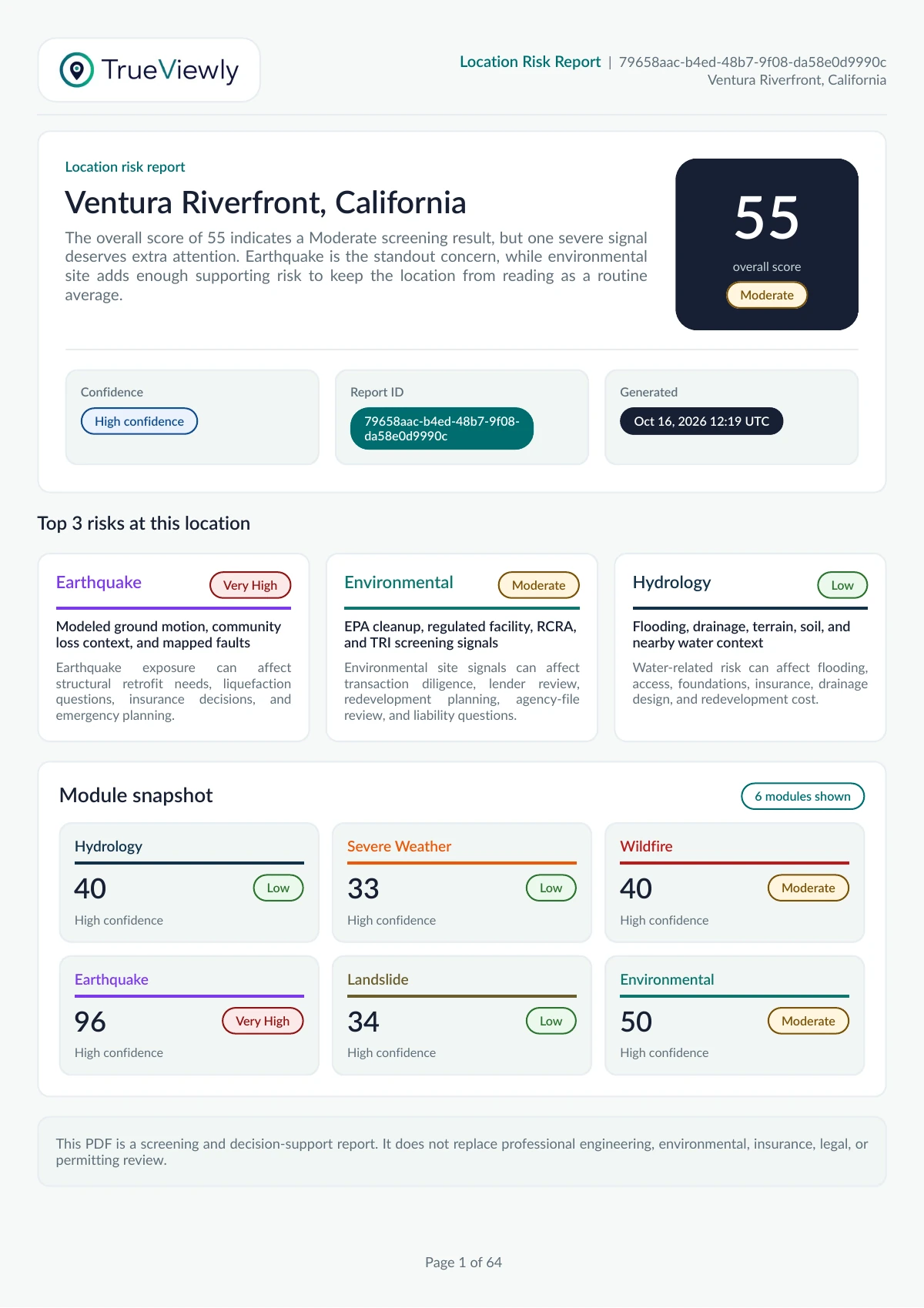
The public Ventura PDF is an actual generated report, not a fabricated portfolio result. Use it to inspect the depth and limitations of a completed location output before uploading a list.
The next question: Keep the original row identifier and resolve location errors before using the output in an acquisition review.
Ventura Riverfront, California · Generated Oct 16, 2026. This retained example illustrates the output, not a current site assessment or customer endorsement.
TrueViewly reports are informational decision-support outputs based on available datasets and user-provided inputs. They are not certifications, legal advice, engineering opinions, insurance determinations, government approvals, or a replacement for official records and professional due diligence.